Thursday, April 8, 2021
Jira next-gen - Open task in a new tab
Opening a Jira issue in a new tab takes a lot of clicks. I wrote a user-script to make it easier - alt-click an issue in a board or backlog view will open that issue in a new tab.


Saturday, May 23, 2020
Automatically Dismiss Google Docs' "You're currently signed in as ..." Pop-up
Tired of seeing these on Google Docs?

I was. I wrote a Tampermonkey script to dismiss it automatically:
https://openuserjs.org/scripts/vshih/Google_Docs_-_dismiss_signed_in_as
Check it out. This issue was discussed on Google's Docs Editors Help, but the question has since been closed.
I was. I wrote a Tampermonkey script to dismiss it automatically:
https://openuserjs.org/scripts/vshih/Google_Docs_-_dismiss_signed_in_as
Check it out. This issue was discussed on Google's Docs Editors Help, but the question has since been closed.
Saturday, October 20, 2018
"Not My First Rodeo" (Me, About My Second Rodeo)
Everyone said second labors are much faster than the first, but we really had no idea how true that was. Three pushes and Wesley was out! Six pounds, five ounces.


Vicki did great, and is thrilled to be done with the dieting!


Vicki did great, and is thrilled to be done with the dieting!
Tuesday, June 12, 2018
Imgur Numbering
I made a thing! It's a Chrome extension that adds numbering to Imgur images.
Unless there's only one image, of course. That would be silly.
Get Imgur Numbering in the Chrome Web Store, and comment here if you have issues.
Unless there's only one image, of course. That would be silly.
Get Imgur Numbering in the Chrome Web Store, and comment here if you have issues.
Sunday, June 8, 2014
The Big Day
It was certainly the most harrowing experience of my life. All the more terrifying considering we hope to go through it again at some point.
We called the doctor's office around 5:30am; Vicki was in a bit of pain but her water had not broken and her contractions were not very consistent. The doctor on-call told us, in a way which clearly indicated he was not quite awake, to wait until the contractions became more consistent. We both tried to get some rest again. I was much more successful, unsurprisingly.
At 9ish Vicki woke me up to tell me the contractions were becoming unbearable. We called the office again, and this time our doctor was on duty. He told us to come in.
We got to the hospital around 9:30am. Turns out Vicki was at 8cm already. A bit flustered, I scrambled to tell her family and wondered if they would be able to get here in time.
Vicki was fully dilated pretty soon, but we tried a few things to get the baby to turn around before trying to push. Eventually they had Vicki start pushing at 1pm. She started off making good progress, but after about two hours or so, things got stuck somewhat. The nurse started telling Vicki to rest every other contraction, and I was getting increasingly anxious watching the baby's heart-rate drop during every push. All the while the possibility of resorting to a C-section loomed, something none of us wanted.


The first week had its share of anxieties too. Warren wasn't sleeping well the first few nights, and I was afraid I might go crazy, anticipating the next three weeks of the same. Turns out Vicki's milk took a while to come in, and the little guy managed to drop to 5.1 lbs by that Friday. We started him on formula at that point, which eased his fussiness a lot at night and he soon returned to his birth weight. Tomorrow we find out the progress he has made since then.
Life, as Vicki and I have known it up to this point, appears to have been changed forever...
We called the doctor's office around 5:30am; Vicki was in a bit of pain but her water had not broken and her contractions were not very consistent. The doctor on-call told us, in a way which clearly indicated he was not quite awake, to wait until the contractions became more consistent. We both tried to get some rest again. I was much more successful, unsurprisingly.
At 9ish Vicki woke me up to tell me the contractions were becoming unbearable. We called the office again, and this time our doctor was on duty. He told us to come in.
We got to the hospital around 9:30am. Turns out Vicki was at 8cm already. A bit flustered, I scrambled to tell her family and wondered if they would be able to get here in time.
Vicki was fully dilated pretty soon, but we tried a few things to get the baby to turn around before trying to push. Eventually they had Vicki start pushing at 1pm. She started off making good progress, but after about two hours or so, things got stuck somewhat. The nurse started telling Vicki to rest every other contraction, and I was getting increasingly anxious watching the baby's heart-rate drop during every push. All the while the possibility of resorting to a C-section loomed, something none of us wanted.
At the three-hour mark we decided to try suction. The room bustled as preparations were made; scrubs were donned, and the doctor put Vicki into stirrups which were of course too big for her. The plastic suction grip was attached, some violent maneuvers ensued, and baby Warren was out, a full mane of hair adorning his impressive torpedo of a head. Born face-up with the cord around his neck, he looked exhausted; his cries were so feeble as the pediatrician whisked him to the warming bed. I cried too, watching him there, both of us so helpless.
The first week had its share of anxieties too. Warren wasn't sleeping well the first few nights, and I was afraid I might go crazy, anticipating the next three weeks of the same. Turns out Vicki's milk took a while to come in, and the little guy managed to drop to 5.1 lbs by that Friday. We started him on formula at that point, which eased his fussiness a lot at night and he soon returned to his birth weight. Tomorrow we find out the progress he has made since then.
Life, as Vicki and I have known it up to this point, appears to have been changed forever...
Monday, May 26, 2014


Sunday, September 30, 2012
Daly Tripper
It's been a few weeks now in our new city! We took advantage of the weekend and made a trip to Golden Gate Park.
While we waited for the Muni at the Daly City BART, an elderly Asian lady tried talking to us, but we couldn't understand her. Finally she pointed to something behind us. Turns out we were waiting at the wrong stop; she must have noticed we were waiting for the 28-bus after seeing us rush to catch the one that just left. I was impressed that she put in the effort to let us know!
We ate and picked up some random necessities at different shops. We even dropped by an estate sale along the way. It turned out to be a really nice, sunny day, which was a huge contrast for me, being cooped up in gloomy, foggy Daly City all week. Here's a picture of us waiting for the bus again, enjoying our first (quite cheap) "self-serve boba" milk tea:
While we waited for the Muni at the Daly City BART, an elderly Asian lady tried talking to us, but we couldn't understand her. Finally she pointed to something behind us. Turns out we were waiting at the wrong stop; she must have noticed we were waiting for the 28-bus after seeing us rush to catch the one that just left. I was impressed that she put in the effort to let us know!
We ate and picked up some random necessities at different shops. We even dropped by an estate sale along the way. It turned out to be a really nice, sunny day, which was a huge contrast for me, being cooped up in gloomy, foggy Daly City all week. Here's a picture of us waiting for the bus again, enjoying our first (quite cheap) "self-serve boba" milk tea:
 |
| Public transportation gluttons |
Friday, October 14, 2011
Hitched
 |
| photo: Alan Harris |
I'd like to give a very heartfelt thanks to everyone who went out of their way to attend. If it wasn't the most complicated ceremony/reception arrangement possible, it must have been close to it. It meant so much to us to be able to see all of your faces. Friends and family came from as far north as Seattle, as far south as Texas, as far west as Taiwan, and as far east as France. As much as Vicki and I dislike being the center of attention, we are so moved by the love and support you all have shown us.
And as if coming out all that way wasn't enough, everyone gave us so much! Thank you all for your kind generosity.
It would be impossible to adequately thank everyone who helped make this happen. We definitely could not have done it without the help of: Vicki's mom, aunts and uncles; her sisters Karen, Mimi, and Betty; and her bridesmaids Joanne and Ann. A special thanks to groomsmen Ben and Joel (and their wives, Claire and Joanne) for throwing me a blast of a party and as well as staying so on top of things throughout the entire marathon of a day.
And a heartfelt apology to all those we couldn't invite. Hopefully we will get to see all of you in the near future.
Thanks again, everyone!
P.S. I also deeply apologize for the band at the reception. Yikes.
Sunday, September 4, 2011
CloudDiff Chrome Extension
CloudDiff - Compare versions of your Dropbox or pCloud text files in-browser or using your configured diff tool.
Updates
2025-01-19 update (version 1.0.3.2) - Fixed the Windows version of the helper.
- On the Dropbox website, browse to the "Version history" page of any text file.
- On the pCloud website, browse to the "Revisions" page of any text file.
- A "Diff" column has been added where you can select which two versions to compare.
- To trigger your already-installed diff tool, click the "Diff" button.
- If a diff tool is not yet configured, the Options page opens where you can specify one. If you don't have one installed already, one option is KDiff3. The setting is accessible from Tools > Extensions > CloudDiff > Options.
- An additional executable must be installed, CloudDiff Helper, in order to trigger your diff tool. Follow the instructions to install.
- If configured correctly, your diff tool should open.
- To perform the diff in-browser, click the "Inline" button.
This should run on Windows, Mac, and Linux. Note that the combined file-size limit in any comparison is 4GB. Please let me know if any issues come up.
Get CloudDiff.
2021-06-28 update (version 1.0.2.28) - Handle Dropbox failure earlier. Button to clear Dropbox token.
2020-06-01 update (version 1.0.2.27) - Upgrade to jQuery 3.5.1, CodeMirror 5.54.0. Handle OAuth token expiration. Fix pCloud caching behavior.
Privacy Policy
Release History
2024-12-25 update (version 1.0.3.1) - Update to match latest Dropbox, pCloud sites. Allow custom Dropbox app key, since the extension is no longer supported in the Chrome Web Store. See https://github.com/vshih/CloudDiff for installation instructions!
2020-05-08 update (version 1.0.2.26) - (never approved) Use Dropbox API to circumvent CORB issue; use the chrome.storage API to store OAuth access token.
2018-02-01 update (version 1.0.2.25) - Rename to "CloudDiff" (formerly "DropboxDiff") with a new Chrome Web Store extension ID -- be sure to update to latest CloudDiff Helper. pCloud support. Switch from jsdifflib to CodeMirror for inline diff.
2017-04-18 update (version 1.0.2.23) - Update to match latest Dropbox format change.
2017-03-13 update (versions 1.0.2.21-22) - Bug fix for diffing non-text files, and files larger than 4K; please get latest "CloudDiff Helper".
2017-01-26 update (version 1.0.2.20) - Implement "Ignore exit status" option.
2017-01-24 update (versions 1.0.2.17-19) - Updated installation instructions for Mac/Linux; bug fixes.
2017-01-21 update (version 1.0.2.16) - Support "Load older versions".
2017-04-18 update (version 1.0.2.23) - Update to match latest Dropbox format change.
2017-03-13 update (versions 1.0.2.21-22) - Bug fix for diffing non-text files, and files larger than 4K; please get latest "CloudDiff Helper".
2017-01-26 update (version 1.0.2.20) - Implement "Ignore exit status" option.
2017-01-24 update (versions 1.0.2.17-19) - Updated installation instructions for Mac/Linux; bug fixes.
2017-01-21 update (version 1.0.2.16) - Support "Load older versions".
...
Thursday, September 1, 2011
Blame it on the Tron
I watched old school Tron the other night. So much awesome kitch in that movie, I couldn't stop grinning during the whole thing.
Some things I noticed, since last time I watched it, a few decades ago:
 The "Watseka" street sign sounded really familiar. Lo and behold:
View Larger Map
I live within 10 miles of Flynn's! We'll have to pay homage some time. Here's the wider shot.
 I don't think they used the same spot for Tron: Legacy, though.
 I also don't remember this blatant Easter egg:
 They even sampled the Pac-Man sound effects. I remember Pac-Man being such an incredible craze at the time (we sang the "Pac-Man Fever" song in school once, badly), but somehow I never caught it here.
The Messianic overtones of the movie were pretty interesting too — Flynn being the User/god, come to inhabit the world of programs in order to save them. I certainly didn't pick that up as an 8-year old. Then again, it's only these days that I spend any time wondering whether our reality is just a computer simulation.
Here's a bit of dialogue I liked quite a bit. Flynn has just revealed to Tron that he is actually a User, and not just a program, like the rest of them.
View Larger Map
I live within 10 miles of Flynn's! We'll have to pay homage some time. Here's the wider shot.
The Messianic overtones of the movie were pretty interesting too — Flynn being the User/god, come to inhabit the world of programs in order to save them. I certainly didn't pick that up as an 8-year old. Then again, it's only these days that I spend any time wondering whether our reality is just a computer simulation.
Here's a bit of dialogue I liked quite a bit. Flynn has just revealed to Tron that he is actually a User, and not just a program, like the rest of them.
Tron: "If you are a User, then everything you've done has been according to a plan, right?
Flynn: "You wish! You guys know what it's like; you just keep doing what it looks like you're supposed to be doing, no matter how crazy it seems."
Tron: "That's the way it is with programs, yes..."
Flynn: "I hate to disappoint you pal, but most of the time that's the way it is for Users, too."
Tron: "Stranger and stranger."Wise words.
Sunday, July 10, 2011
Facebook Dis
Have you ever been alone, minding your own business, and suddenly realize that someone has been following you, watching your every move, for the past two hours?
That's what it feels like when I'm visiting different websites and I suddenly see:

"[various friends] like this."
The scary thing is that the stalker metaphor is quite appropriate – Facebook really is stalking you, keeping track of wherever you go whenever you see one of these.
So I really liked a Chrome extension called Facebook Disconnect. Unfortunately, it tends to break some sites (Scrabble, in particular). So I extended the extension to allow whitelisting certain sites.
Presenting: Facebook Dis.
If you really want to get fancy you can read the whitelist from a specific URL, say a website or public Dropbox file. This lets you to configure several installations of Facebook Dis in a single place; all instances will stay up to date automatically the next time you open your browser or click "refresh" from the options page.
Thanks to Brian Kennish for the original Facebook Disconnect.
That's what it feels like when I'm visiting different websites and I suddenly see:
"[various friends] like this."
The scary thing is that the stalker metaphor is quite appropriate – Facebook really is stalking you, keeping track of wherever you go whenever you see one of these.
So I really liked a Chrome extension called Facebook Disconnect. Unfortunately, it tends to break some sites (Scrabble, in particular). So I extended the extension to allow whitelisting certain sites.
Presenting: Facebook Dis.
If you really want to get fancy you can read the whitelist from a specific URL, say a website or public Dropbox file. This lets you to configure several installations of Facebook Dis in a single place; all instances will stay up to date automatically the next time you open your browser or click "refresh" from the options page.
Thanks to Brian Kennish for the original Facebook Disconnect.
Thursday, March 31, 2011
Fast Make for Vim
2019-02-12 update - Added g:Make_quickfix_always_open option.
2014-05-18 update - This is now vim-make on GitHub.
I wasn't really satisfied with Vim's :make behavior so I wrote a script to do what I wanted.
This is basically my first Vim plugin so please let me know if there are things I could improve.
2014-05-18 update - This is now vim-make on GitHub.
I wasn't really satisfied with Vim's :make behavior so I wrote a script to do what I wanted.
- Saves buffer first
- If there are errors, show them in the quickfix window
- Success is reported in the status bar
- Saves some keystrokes, especially if mapped to
F5
~/.vim/plugin/Make.vim, or if you are using pathogen, ~/.vim/bundle/Make/plugin/Make.vim.This is basically my first Vim plugin so please let me know if there are things I could improve.
"=============================================================================
" File: Make.vim
" Author: Victor Shih <victor.shih@gmail.com>
" Last Change: 2/11/2019
" Version: 0.02
" WebPage: http://blog.vicshih.com/2011/03/fast-make-for-vim.html
" Description: Modestly enhanced `make` for Vim.
"
function! Make(args)
" Compile arguments.
let l:args = strlen(a:args) ? ' ' . a:args : ''
let l:title = expand('%') . ' - Make' . l:args
" Force write.
silent update!
" Find the closest directory to the current file with a [Mm]akefile.
let l:makefile_dir = s:find_makefile_dir()
" Move to that directory and make.
let l:out = split(system('cd ' . l:makefile_dir . ' && make' . l:args), "\n")
let l:len = len(l:out)
" Output to quickfix.
cgetexpr l:out
let w:quickfix_title = l:title
if g:Make_quickfix_always_open == 1 || l:len > 1
copen
cc 1
elseif l:len == 0
" No output; just report success.
cclose
redraw
echo l:title . ' succeeded'
else
" Output is a single line; echo it.
cclose
cc 1
redraw
echo l:out[0]
endif
endfunction
function s:find_makefile_dir()
let l:dir = expand('%:p:h')
while 1
" Ensure we have only one '/'.
if !empty(glob(substitute(l:dir, '/$', '', '') . '/[Mm]akefile'))
return l:dir
else
let l:parent = fnamemodify(l:dir, ':h')
if l:parent ==# l:dir
" We reached the root but didn't find a Makefile.
return '.'
endif
let l:dir = l:parent
endif
endwhile
endfunction
" Register command.
command! -nargs=? Make call Make("<args>")
let g:Make_quickfix_always_open = get(g:, 'Make_quickfix_always_open', '0')
let g:Make_loaded = 1
" File: Make.vim
" Author: Victor Shih <victor.shih@gmail.com>
" Last Change: 2/11/2019
" Version: 0.02
" WebPage: http://blog.vicshih.com/2011/03/fast-make-for-vim.html
" Description: Modestly enhanced `make` for Vim.
"
function! Make(args)
" Compile arguments.
let l:args = strlen(a:args) ? ' ' . a:args : ''
let l:title = expand('%') . ' - Make' . l:args
" Force write.
silent update!
" Find the closest directory to the current file with a [Mm]akefile.
let l:makefile_dir = s:find_makefile_dir()
" Move to that directory and make.
let l:out = split(system('cd ' . l:makefile_dir . ' && make' . l:args), "\n")
let l:len = len(l:out)
" Output to quickfix.
cgetexpr l:out
let w:quickfix_title = l:title
if g:Make_quickfix_always_open == 1 || l:len > 1
copen
cc 1
elseif l:len == 0
" No output; just report success.
cclose
redraw
echo l:title . ' succeeded'
else
" Output is a single line; echo it.
cclose
cc 1
redraw
echo l:out[0]
endif
endfunction
function s:find_makefile_dir()
let l:dir = expand('%:p:h')
while 1
" Ensure we have only one '/'.
if !empty(glob(substitute(l:dir, '/$', '', '') . '/[Mm]akefile'))
return l:dir
else
let l:parent = fnamemodify(l:dir, ':h')
if l:parent ==# l:dir
" We reached the root but didn't find a Makefile.
return '.'
endif
let l:dir = l:parent
endif
endwhile
endfunction
" Register command.
command! -nargs=? Make call Make("<args>")
let g:Make_quickfix_always_open = get(g:, 'Make_quickfix_always_open', '0')
let g:Make_loaded = 1
Monday, November 29, 2010
Ruby Autoflush
Google seems to need help with this particular association, so here goes.
In Ruby, to flush currently buffered data just once, call
In Ruby, to flush currently buffered data just once, call
flush on the handle in question:STDOUT.flushsync attribute:STDOUT.sync = trueSunday, April 25, 2010
Keyboard Shortcuts for Facebook Photo Tagging
Finally got around to tagging some photos in Facebook. I probably would not have bothered, had gleeBox not made it a bit tolerable by providing some form of keyboard shortcuts for the process:
This allows tagging to go as follows:
7/24/10 Update: Updated to skip new "Share" link.
- Created an "ESP vision" for the Page URL
with the jQuery selectorfacebook.com/photo.php#photoactions>a[onclick],input[type="submit"]#photoactions>a:first-child,input[type="submit"] - Changed my "Shortcut to launch gleeBox" to ";"
This allows tagging to go as follows:
- Navigate to a Facebook photo album
- Press
;<ENTER>with left hand to enter tagging mode - Tag at will
- Press
;<ENTER>again to leave tagging mode - Left-click photo to move to the next photo
7/24/10 Update: Updated to skip new "Share" link.
Thursday, April 15, 2010
Mac Remote Desktop Connection Keyboard Shortcuts
To send the three-finger salute,
Ctrl+Alt+Del, to a Windows box when you are connected using a Mac via Microsoft's Remote Desktop Connection, try Ctrl+Option+Delete (backspace).
Sunday, April 4, 2010
Edit "Save Password" Exceptions in Google Chrome for Mac OS X
If you're a Google Chrome for Mac OS X user and you've ever hit "Never for this site" by accident (or have girlfriend who does so consistently), it's a little tricky finding out how to edit these "Save Password" exceptions. It's pretty clear for Windows' Chrome:
http://www.google.com/support/chrome/bin/answer.py?hl=en&answer=156325
but I had trouble finding a solution for the Mac. A little snooping reveals that Chrome keeps its login information in a SQLite database file:
http://www.google.com/support/chrome/bin/answer.py?hl=en&answer=156325
but I had trouble finding a solution for the Mac. A little snooping reveals that Chrome keeps its login information in a SQLite database file:
~/Library/Application Support/Google/Chrome/Default/Login Data- Shut down Chrome
- Probably a good idea to make a backup of the database file
- Open the database file in a SQLite database browser; I use SQLite Database Browser
- Select the "Browse Data" tab
- Sites for which "Never for this Site" has been selected will have the value
1for the columnblacklisted_by_user. Double-click the desired cell, change the value to0, and click "Apply Changes" - Save and close the database file
- Restart Chrome
Monday, April 27, 2009
Ubiquity - Bugmenot command
I like to use BugMeNot when trying to access some websites which require registration, most frequently the New York Times.
Bugmenot has a bookmarklet, but it opens a new window, and is therefore slow, and you have to copy and paste login information yourself.
Ubiquity is a command line interface to various things for Firefox.
I've created a Bugmenot command for Ubiquity.
Simply execute
If that login has expired, you can specify an entry number as a parameter, from the list of entries in the Ubiquity preview pane.
Get it at http://gist.github.com/102363.

Some code was borrowed from Onur Yalazı and Brandon Goldsworthy.
7/9/09 update: Updated to support Ubiquity's Parser 2. The old code is still available here.
Bugmenot has a bookmarklet, but it opens a new window, and is therefore slow, and you have to copy and paste login information yourself.
Ubiquity is a command line interface to various things for Firefox.
I've created a Bugmenot command for Ubiquity.
Simply execute
bugmenot while viewing the desired login page, and the top-ranked Bugmenot entry will be populated and submitted.If that login has expired, you can specify an entry number as a parameter, from the list of entries in the Ubiquity preview pane.
Get it at http://gist.github.com/102363.

Some code was borrowed from Onur Yalazı and Brandon Goldsworthy.
7/9/09 update: Updated to support Ubiquity's Parser 2. The old code is still available here.
Friday, January 2, 2009
Fix for Firefox’s Password Exporter Add-on
7/23/09 Update: Updated to be compatible up to Firefox 3.5.1.
1/8/09 Update: If you tried installing the .xpi and got “Firefox could not install the file at [...] because: Not a valid install package -207,” please see the revised download instructions below.
I like Firefox’s Password Exporter Add-on, but recently I noticed a bug with version 1.1 (released January 5, 2008) when importing into Firefox 3. Several entries return the following error:
I’ve posted the .xpi at http://www.vicshih.com/files/password_exporter-1.1-fx_tb-formSubmitURL-fix.xpi (90.1KB).
Right-click and Left-click this link, which should prompt Firefox to download to your machine. My web page does a redirect, so right-clicking directly actually saves an intermediate web page, which is not what you want. If in doubt, make sure file size is correct. Drag to a browser window to install.
Here’s the diff, in case you are queasy about installing my unsigned version.
Within the file
1/8/09 Update: If you tried installing the .xpi and got “Firefox could not install the file at [...] because: Not a valid install package -207,” please see the revised download instructions below.
I like Firefox’s Password Exporter Add-on, but recently I noticed a bug with version 1.1 (released January 5, 2008) when importing into Firefox 3. Several entries return the following error:
'Can't add a login with both a httpRealm and formSubmitURL.' when calling method: [nsILoginManager::addLogin]
I’ve posted the .xpi at http://www.vicshih.com/files/password_exporter-1.1-fx_tb-formSubmitURL-fix.xpi (90.1KB).
Here’s the diff, in case you are queasy about installing my unsigned version.
Within the file
chrome/content/passwordexporter.jar, in the file content/pwdex-loginmanager.js,
540,541c540,549
<
<                 var bogusLoginInfo = new nsLoginInfo(entries[i].hostname, 'http://passwordexporter',
---
>     var doModify = false;
>
>     var formSubmitURL = entries[i].formSubmitURL;
>
>     if (formSubmitURL) {
>      formSubmitURL = '';
>      doModify = true;
>     }
>
>                 var bogusLoginInfo = new nsLoginInfo(entries[i].hostname, formSubmitURL,
548c556
<                     loginManager.modifyLogin(bogusLoginInfo, entries[i]);
---
>                     if (doModify) loginManager.modifyLogin(bogusLoginInfo, entries[i]);
Tuesday, November 4, 2008
Shortcut to Toggle Firefox Bookmarks Toolbar (like Chrome)
One of the things I've really liked about Google Chrome is the ability to toggle the bookmarks toolbar with a quick
Another key I've added is a shortcut to toggle the status bar. Here's the code:
Ctrl+B. I hunted around for this ability in Firefox but it took a little finagling -- here's the how-to:- Install Keyconfig.
- Open Keyconfig's configuration dialog via "Tools | Keyconfig..." or
Ctrl+Shift+F12. - If you want to use
Ctrl+Bto toggle the Bookmarks Toolbar, first disable the default association to "Bookmarks" by selecting it and clicking the "Disable" button. - Click the "Add a new key" button and fill out the form using the following:
- Name:
Toggle Bookmarks Toolbar - Code:
var b = document.getElementById('PersonalToolbar');
b.collapsed = !b.collapsed;
- Name:
- Click "OK."
- Select your new key, select the text field, type your desired shortcut (
Ctrl+B, for example), and click "Apply."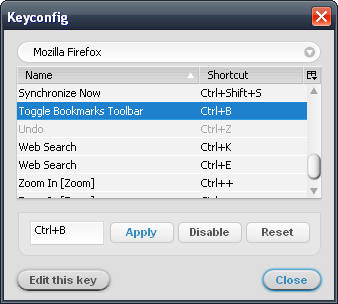


Another key I've added is a shortcut to toggle the status bar. Here's the code:
var s = document.getElementById('status-bar');
s.hidden = !s.hidden;
Enjoy!
Saturday, April 12, 2008
Todoist Sidebar - Firefox Add-On
 Note: please see the latest update.
I recently switched from Google Notebook to Todoist for my to-do lists. I'd searched a while for a list manager that could do hierarchical tasks, and Todoist looks like the only one that does, at least for free. It does hierarchical projects too, in fact.
One hack I saw on their site described a way to load Todoist into Firefox's sidebar, basically by bookmarking a simplified view of the site and checking "Load this bookmark in the sidebar." Nice!
My joy soon soured though, when I noticed that adding a task has the side-effect of loading the Todoist website into the main browser window, browsing over whatever site you already have in the current tab. Not so nice.
 Plus, I don't like the fact the button to open the sidebar (really just a bookmark) doesn't toggle -- to close the sidebar, you have to mouse all the way over to the sidebar's close button! Ridiculous! And though you can define a keyword for the bookmark which allows easy access through the address bar, there's no way to define a keyboard shortcut to hide the sidebar.
So, I put together a Firefox add-on which solves these problems, which I have creatively christened Todoist Sidebar.
Some perhaps non-obvious things to note:
- Left-click the toolbar button to toggle the Todoist sidebar.
- Middle-click the toolbar button to open Todoist in a new tab.
- The default keyboard shortcut is
Alt+Shift+2on Windows and Linux, andCmd+Shift+2on the Mac.
- The keyboard shortcut can be customized by modifying the string values
todoist-sidebar.keyandtodoist-sidebar.modifiersinabout:config, according to Mozilla's XUL:key specification. A Firefox restart is required for the changes to take effect. Setting either of these values to blank disables the keyboard shortcut.
 All of this will probably be moot once Google continues their world conquest by rolling out their Calendar tasks implementation. But hey, it will be fun while it lasts...
Right now the add-on is hosted in the Firefox add-on sandbox.
10/15/08 update: Okay, Amir, the creator of Todoist, contacted me a bit ago all the way from Denmark to collaborate on the Todoist Sidebar, and he has updated it and now maintains it on the Todoist website! He blogged about it at http://amix.dk/blog/viewEntry/19333. Please go there to install. Woohoo!
5/15/08 update: Hm, it seems to still exhibit the naughty toggle behavior described in the comments on initial install. Restarting Firefox makes the problem go away. I'll look into this at some point. Lame!
4/28/08 update: Version 1.0.2 fixes the previously mentioned bug where any key press triggers the sidebar. Also the default key accelerator is now
Alt+Shift+2 for Windows and Linux, and Cmd+Shift+2 for the Mac.4/26/08 update: Please note that currently there is a bug with the default installation where every key press toggles the sidebar (see comments). This is due to my incorrectly implementing the default shortcut key. Also, the intended default is a bit problematic because it tends to interfere with the Tools menu accelerator.
I plan to change the default to
Alt+Shift+2 (Cmd+Shift+2 on the Mac) when I get the chance. In the meantime, you can do this yourself by setting todoist-sidebar.key to "2" and todoist-sidebar.modifiers to "alt shift" for Windows/Linux or "accel shift" for the Mac in about:config.4/24/08 update: Please note that some users are experiencing behavior where every key they type (or some subset) toggles the sidebar (see comments). This may possibly be remedied by fiddling with the
todoist-sidebar.modifiers setting in about:config. Please be patient and I'll look into this shortly.
Subscribe to:
Posts (Atom)